Hey Guys and Gals
wonderful weekend!!!
Let's have a glimpse at the Microsoft Windows 8.1

Its the latest release of Microsoft and it is a cross platform OS. Which seems and works the same on mobile(phone, tablet, laptop) as well as desktop devices.
With a very nice and wonderful start screen. Having live tiles that shows you all the current info on spot.
Using a mouse on a laptop or desktop and using your hand on a touch screen device having become the same in this OS.
The best things About It are As following
Now how to use it.
Just think of adding cream to your coffee
That's all!!!
Press the power on button
wait for a few seconds
and boom
you are up

as soon as the main start screen appears you are able to Access all your apps
Yes all of them
Now no app is hidden in fluffy folders in the old school start menu
you just have to boot your pc up and the apps are there.
install a new app
and the icon is automatically appeared on the start screen with a twist
Most of them are live tiles showing you all the latest upgrades from the software as soon as you boot up your PC.
Install Facebook, Twitter or any other Social Network and you would observe it your self.
Plussssssssssssss
You can watch a slideshow of your favorite photos and even answer skype calls
without unlocking your PC.
The fluidity of the OS just doesn't stop here...
Move your pointer to Left or Right corner of your PC Screen.
Lo and Behold!
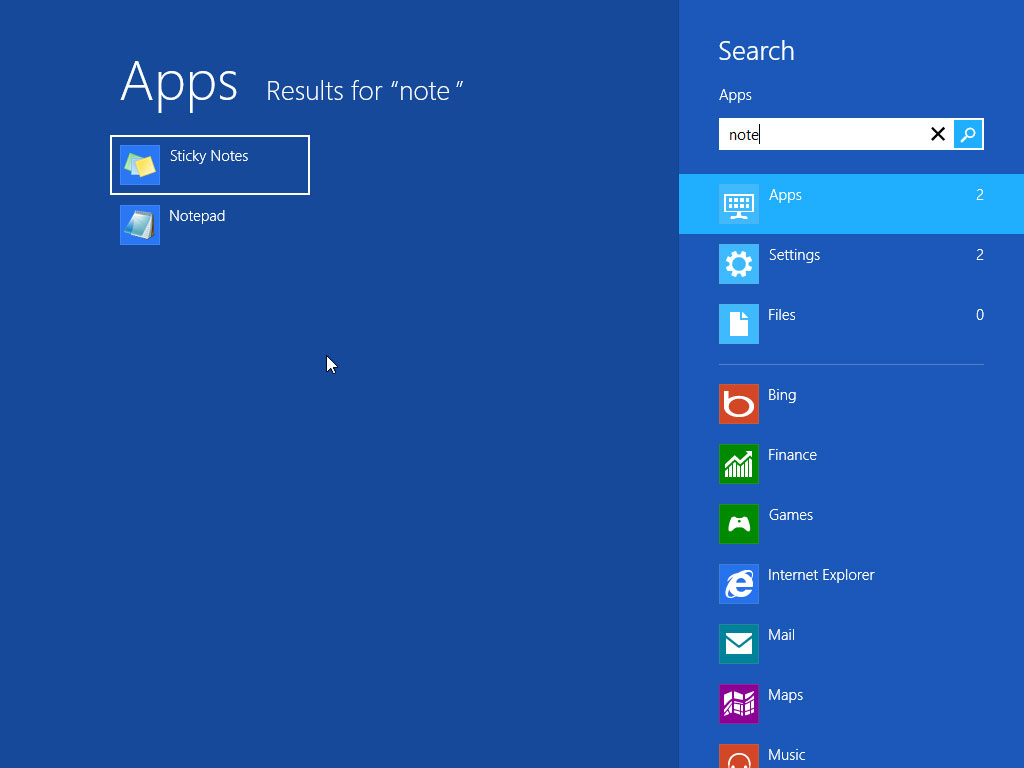
on Left side a quick search bar appears
search on Bing
Search apps
or search anything ... You are at the right place.
And not just That
You have a shortcut to share what ever is on your screen
You have a shortcut to the main start screen
You have link to all the devices attached to your pc
and a setting shortcut too ...
And on the right
You have a Wonderful shortcut list of all the apps currently running on your PC
swap up between the apps or just right clicks on any of them and close it from there
You can do both.


wonderful weekend!!!
Let's have a glimpse at the Microsoft Windows 8.1
Its the latest release of Microsoft and it is a cross platform OS. Which seems and works the same on mobile(phone, tablet, laptop) as well as desktop devices.
With a very nice and wonderful start screen. Having live tiles that shows you all the current info on spot.
Using a mouse on a laptop or desktop and using your hand on a touch screen device having become the same in this OS.
The best things About It are As following
- It starts Faster
- You can search Every Where
- You can Multitask with Apps
- Through Store You can Add More Apps to it.
- It is customization to a great pace you can Use It Your Ways
- It can power down very fast.
- It Always have your files
- and last but not he least it has a wonderful browser so
"You can browse better."
Now how to use it.
Just think of adding cream to your coffee
That's all!!!
Press the power on button
wait for a few seconds
and boom
you are up
as soon as the main start screen appears you are able to Access all your apps
Yes all of them
Now no app is hidden in fluffy folders in the old school start menu
you just have to boot your pc up and the apps are there.
install a new app
and the icon is automatically appeared on the start screen with a twist
Most of them are live tiles showing you all the latest upgrades from the software as soon as you boot up your PC.
Install Facebook, Twitter or any other Social Network and you would observe it your self.
Plussssssssssssss
You can watch a slideshow of your favorite photos and even answer skype calls
without unlocking your PC.
The fluidity of the OS just doesn't stop here...
Move your pointer to Left or Right corner of your PC Screen.
Lo and Behold!
on Left side a quick search bar appears
search on Bing
Search apps
or search anything ... You are at the right place.
And not just That
You have a shortcut to share what ever is on your screen
You have a shortcut to the main start screen
You have link to all the devices attached to your pc
and a setting shortcut too ...
And on the right
You have a Wonderful shortcut list of all the apps currently running on your PC
swap up between the apps or just right clicks on any of them and close it from there
You can do both.
Now comes the question of control panel.
The simplest way to do it is
Point to the upper left corner of your Screen
Go to settings
Go to Change PC Settings.
and there you are in Control Panel.
To know more from the Microsoft Website Just visit the link below.
All right folks
That's all for today (Will post a video and a little more details soon...)
keep visiting and don't forget to
Subcrite to Our RSS
Pressing that g+ button
and also do like our facebook page
Comments